You don't need a third-party network to share your weather. With a WordPress site and the WS40 plugin, your station publishes to a page that's entirely yours — live gauges, charts, webcam and full history.
When people ask how to get a weather station online, they usually mean one of two things. The first is joining a shared network — Weather Underground, a national meteo network — where your readings live on someone else's platform, in someone else's layout, under someone else's rules. It's quick, and it's fine for simply contributing data.
The second is having a site of your own: your domain, your design, your database, your full history — a page you control and can build on. That's what this guide is about, and exactly what WS40 was made for. You can do both at once, but only the second one is truly yours.
Fast to set up, no site needed — but the data, layout and longevity belong to the platform, not to you.
Your domain, your design, your database. More control and your history kept for good — the WS40 approach.
Three things — and you probably already have the first two.
Any standard WordPress install, on the hosting you already use. No separate server or engine to run.
Your hardware pushing through Meteobridge, Weather Display, WeeWX or WeatherCat — or an Ecowitt gateway, or a Davis logger. The gear you run today.
Install it like any plugin — no FTP, no fatal errors to chase, automatic updates. A free version exists; Premium adds the full toolkit.
The whole path, from an empty page to a live station, is short.
Add the plugin from your dashboard and activate it. Nothing to compile, no separate service to keep running.
Point your station at WS40. Meteobridge, Weather Display, WeeWX and WeatherCat push to the WS40 URL using your token as the password. Ecowitt GW1000–GW3000 gateways push directly with the Ecowitt/Wunderground protocol. Davis stations are pulled straight from the WeatherLink v2 API — no bridge in between.
Drag the blocks you want — gauges, a live dashboard, charts, webcam — into zones, save the layout per station, and place it anywhere with a shortcode.
Switch on the Open-Meteo forecast, official MeteoAlarm warnings for 37 European countries, and NOAA-style monthly and annual reports.
Hit publish. Your station is online on your own site, updating live — exactly the page a visitor would see on a real WS40 station.
Going online doesn't mean starting from zero. WS40 imports your existing records natively: export your data file and it auto-detects every column — temperature, humidity, wind, pressure, rain, solar and the rest — mapping each to the right field, with no manual setup.
It reads the Meteotemplate alldata format, Cumulus files and plain CSV. Users have brought archives back to 2006 without losing a single reading.
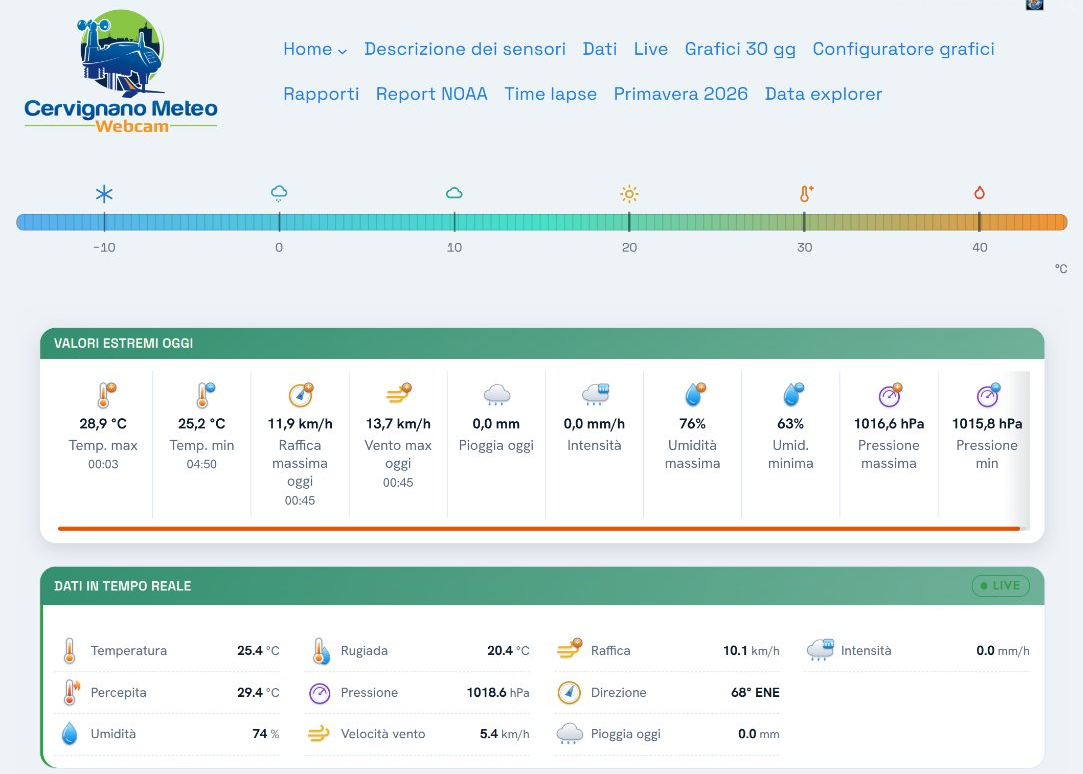
The most honest example isn't a screenshot — it's a real station publishing live data this second: gauges, a dashboard, charts and history, exactly what your own page could look like. You can also open a demo and try the dashboard yourself, with no setup.
cervignanometeo.org — a real WS40 station.

Yes — that's the whole point of WS40. Instead of hosting your readings on a shared platform, you publish them on your own WordPress site, with your own design and your own database.
Meteobridge, Weather Display, WeeWX and WeatherCat by push; Ecowitt GW1000–GW3000 gateways directly; and Davis stations through the WeatherLink v2 API. Open-Meteo provides the forecast.
No. WS40 is a WordPress plugin: you install it, connect your source, and build your page by dragging blocks. Placing it on a page is a single shortcode.
Yes. WS40 imports the Meteotemplate alldata format, Cumulus files and CSV, detecting and mapping every column automatically — so your archive comes with you.
Yes. cervignanometeo.org is a live WS40 station, and a free trial lets you explore the dashboard and the HUD, and look inside the plugin, before installing anything.
A weather station is more rewarding when the page is truly yours. Take a look at a live one, explore the plugin, and set yours up when you're ready.
A WordPress plugin for personal weather stations · Meteobridge · Cumulus · Davis WeatherLink v2